
Cable sizing.
A clearer view of
every option.
Compare cable sizes, current ratings and voltage drop in one familiar Excel worksheet. For armoured cables, singles and twin-and-earth.
Advanced Electrical Designing · Windows desktop Excel
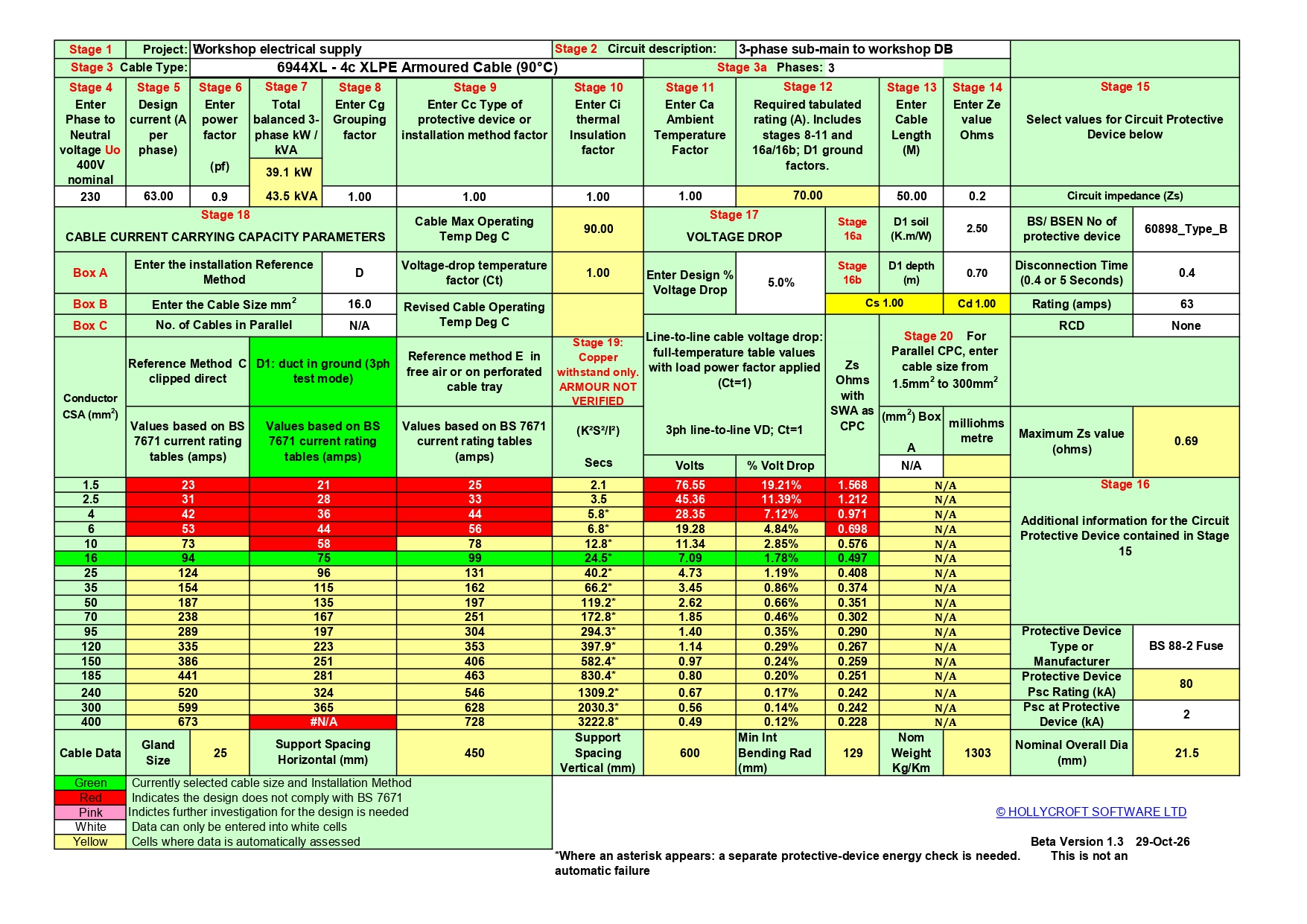
The right worksheet for the job.
Choose a calculator to view its spreadsheet layout. These previews show the worksheets used in the software.
Beta XLPE/SWA workbook layout, saved in single-phase mode. Use Stage 3a in Excel to select the supply phases.
* The new three-phase XLPE/SWA facility is a beta version for testing and feedback. This applies to the three-phase facility only.
Enter. Compare.
Keep the record.
The numbered stages guide you through the inputs, while the cable-size table keeps the alternatives in view.
Set up the circuit
Choose the cable type and installation method. Enter the load, run length, correction factors and protective-device details.
See the alternatives
Review current ratings, voltage drop and the available fault-protection calculations across the cable sizes.
Save your calculation
Add project and contractor details. Complete the required design checks, then save and print the worksheet for the job.
Also included: conduit, trunking, load diversity and drawing tools
Plus other useful features in Advanced Electrical Designing.
Practical tools.
One familiar package.
Available separately, or included in Electrical Contractor’s Office.
Buy now — £49 ↗See what’s new
in your design tools.
The new three-phase XLPE/SWA facility extends the familiar cable calculator. Contact us about your latest version or renewing your update service.
Ask about your update ↗Advanced Electrical Designing is also included in Electrical Contractor’s Office. Explore the full package.
A few useful details.
Which cable types are included?
XLPE/SWA: 2-core, 3-core and 4-core 90°C armoured cables. Singles: 6491X PVC and 6491B LSF single-core arrangements. Twin-and-earth: 6242YH PVC and 6242BH LSF flat cables, including installation methods 101, 102 and 103 in the supplied calculator.
What does the three-phase facility cover?
Balanced AC supplies using 3-core or 4-core XLPE/SWA cable, with methods C, D1 and E. Method D1 is cable in a buried duct; direct burial D2 is not included. Unbalanced loads, significant neutral harmonics and motor starting require separate assessment.
What do I need to run the software?
Windows desktop Microsoft Excel. Enable the trusted workbook macros for automatic soil/depth switching and the workbook buttons. The website images preview the spreadsheet layouts; enter your job details in the Excel software.
What should I check before accepting a design?
Complete the applicable capacity, voltage-drop, earth-fault, protective-device, CPC/armour and parallel-cable checks. Where an asterisk appears in Stage 19, a separate protective-device check is needed; it is not an automatic failure. Times above five seconds are outside the adiabatic equation’s stated range. A displayed value is not a full design approval. Use 90°C ratings only where equipment and terminal suitability permit.
Can I compare an example with my existing calculator?
Yes. Match cable type, phase setting, load, length, device and correction factors before comparing results. The new XLPE/SWA version uses the greater of load and device rating for required cable rating, and includes revised voltage-drop calculations.
Watch the original software walkthrough
An introduction to the established cable sizing software. The new three-phase facility is available in the XLPE/SWA workbook shown above.